
Server Header - Single Sign On Setup
The following describes how to set up Single-Sign-on using Server Headers in dbFront.
Setup Steps
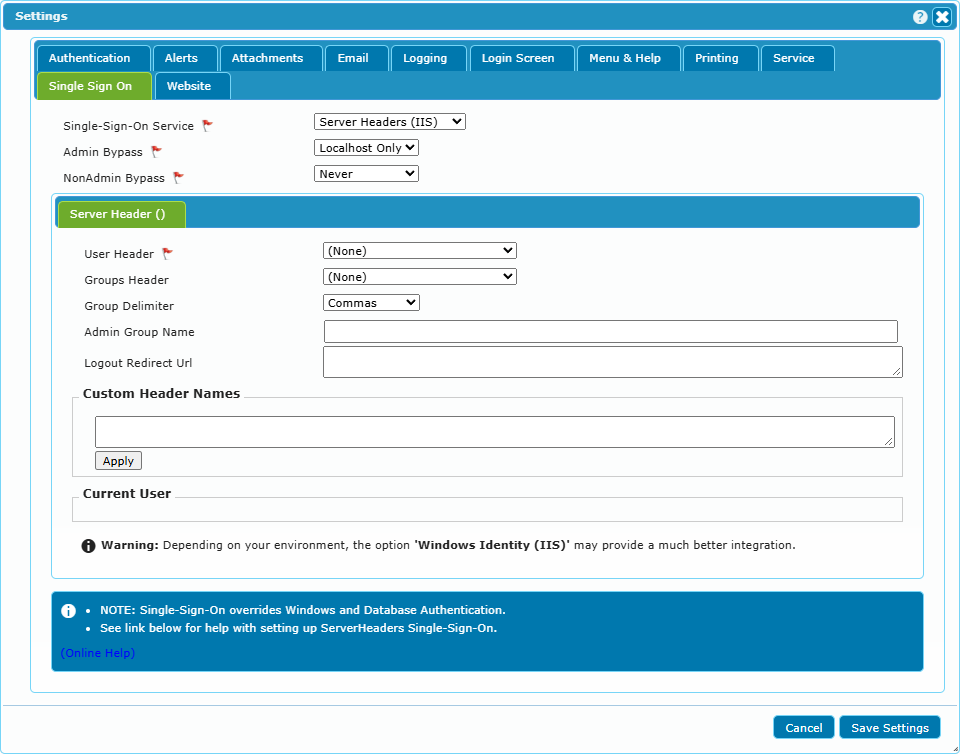
When using Server Header based authentication, dbFront will query the Server Headers and trust that they will return the accurate user information. The server headers are retrieved on initial load of the web application and used to create the application session.
dbFront supports two specific server headers.
User Header (Remote User)
The first header is expected to contain the username. The standard server header used for this is "Remote_User" but dbFront will allow you to select any of the available server headers. If required you can even specify one or more custom server headers. This may be required if your IdP does not update the list of available server headers.
Groups Header
The second header dbFront supports is a Groups Header, which is expected to contain a delimited list of the current user groups. This is a non-standard header, which if available, can be significantly helpful. dbFront supports multiple delimiter options.
Admin Group Name
If the Admin Group Name is specified then the user will automatically be classed as an SSO Admin if they appear to be a member of the named group.
For complete instructions on completing the dbFront Single-Sign-on setup see: Single-Sign-on
Trouble Shooting
For a list of Single-Sign-On issues and answers see: Single-Sign-On Questions