
Installation Overview
dbFront can be fully set up in 3 minutes or less but the practical decisions about where and how to set it up mean that it may take longer. Some of the decisions that need to be made upfront are:
- deciding if it should be set up in a DMZ (so that external users can access it without compromising security),
- finding a server or servers to host it,
- doing the actual setup and testing,
- giving specific users access.
If you are not sure which network configuration you should use, then please read the Setup Options section below which explains the different setup options.
Setup Steps
The dbFront installer will install both the Web Application and the Service correctly. If you installed everything on the same server then you can skip to step 3 where you set up the database connections. If you chose a manual installation, or if your situation is more complex then you can review the settings in steps 1 and 2.
- Setup the Webserver with the dbFront UI web application
- Setup the Application server with the dbFront Application Service
- Update the Application Server to allow database access
Setup Options
There is a wide variety of network setup options available. The following two sections will compare two of the main options but the installation can usually be tailored to suit your network needs.
Single Server Setup
dbFront can be run entirely from a single server. This server could even be the database server. But just because it can be done does not mean that it should be done.
A single server installation should only be considered in situations where:
- The server is internal to your network (security is not a serious consideration)
- No access to the internet is permitted (or only via VPN),
- The database and the application loads are small.
Advantages
- A single server to install, maintain and backup.
- Potentially fast if the server is not overloaded because the only network traffic is between the server and the client since all other traffic between the database, application server, and web server are internal.
Disadvantages
- Difficult to properly secure. Should NOT be exposed to the web or only via VPN access.
- A single and much easier target for an attacker to compromise.
- The server load will be too high for larger or high-load databases.
Distributed Server Setup (including DMZ)
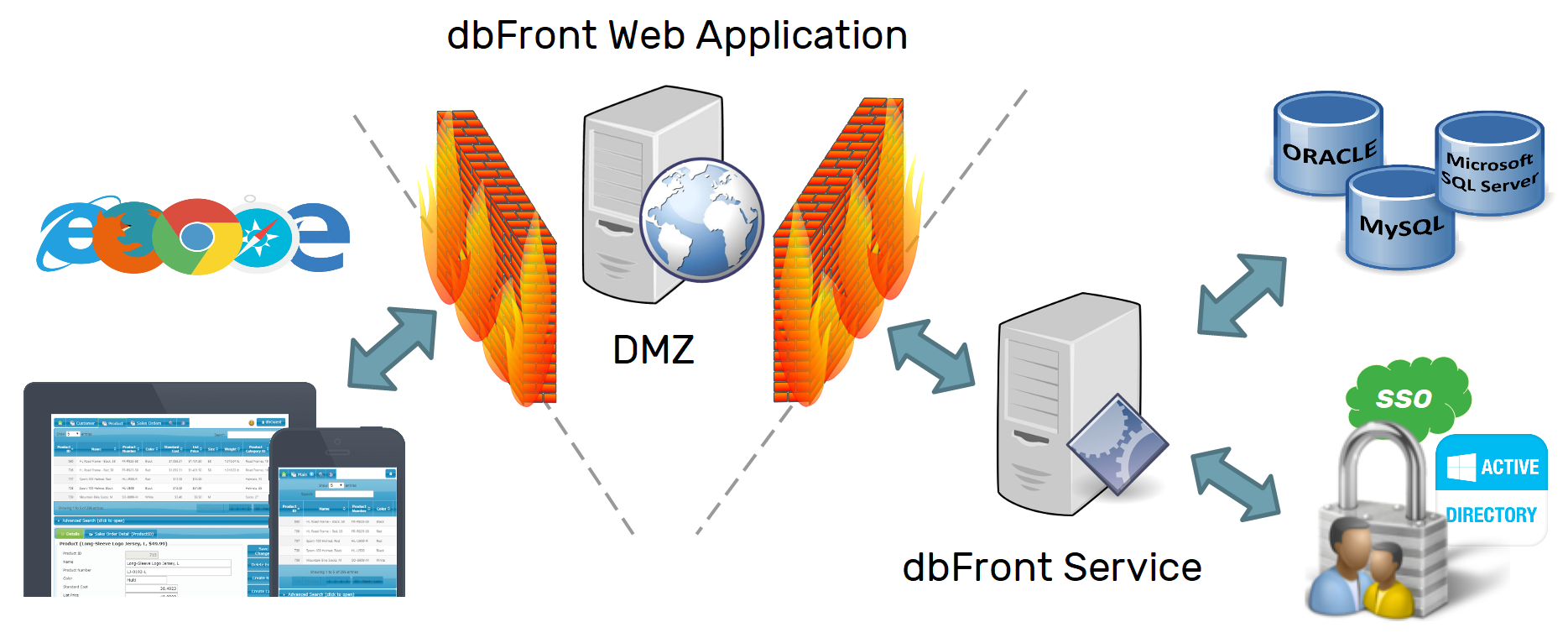
The most secure and optimal setup is to spread the Database, Application Server and Web Application over three servers. The Database and Application Servers should be installed inside your internal network. The Web Application server should be installed in a DMZ.
A DMZ is a special network zone created for web servers that sits between the fully exposed internet and your internal network. Some configurations leave the servers in the DMZ fully exposed, but the best solution is to limit access from the internet to only the port(s) required (HTTPS). The web server in the DMZ then communicates to the Application Server (dbFrontService) in the secure network via the internal firewall using a single custom port. Additional steps are possible to block any lateral movement (VLANs). The result is a path into your network that is very difficult to compromise.
When connecting to the database, you should also use accounts that have the least privilege possible to help limit any possible damage.
Advantages
- Far more secure since an attacker would have to compromise multiple servers via two thin (1 port) straws before they could get into the network.
- Most robust setup since three servers share the workload.
Disadvantages
- Most complex setup. Need to configure and manage the interaction between multiple servers and firewalls.
- Highest potential latency because a full request to the database will involve multiple network hops as the request passes between the various firewalls and servers back to the client browser.
- Most expensive due to the added hardware, licensing and maintenance.
Next Step
Once the layout of the infrastructure has been decided then the next step would be to set up the webserver and install the dbFront UI.